User Guide
How to use Common Strangers
Common Strangers is a space to share work, discover ideas and connect with people. You can explore without an account, or register to contribute your own work, post on the community board and join conversations.
Find your way around
On a computer, the Home Page works like a desktop. Choose a category from the menu to open its window. You can move windows around, minimise or maximise them, and close them when you’re done.
Use the arrow in a window’s top bar to open its content on a full page.
To start again with a clear desktop, use the Broom on the bottom right.
Bonus fun: Customise your home screen by choosing your favourite backdrop photo from the bottom right. Every visit looks a little different!
On mobile, the layout switches to a vertically scrolling format.
Discover work
Choose a category from the homepage menu, or go to the Explore Page to browse everything published.
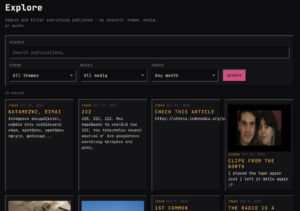
In Explore, you can search by keyword and filter by theme, media type or month. Select Search to see the results, then open any piece to read, watch or listen.
Some categories have sub-sections. Choose one to narrow down what you see, or select /all where available to see everything in that category.
Roles
| Role | Can do | Given |
| Visitor | Navigate the site anonymously | Default |
| Reader | Comment, submit work for review, keep a profile. | On registration |
| Contributor | The same. The difference is the badge on your profile indicating you have a piece of your work posted. | Automatically, when your first publication is reviewed and posted |
Create an account
Select Sign in, then Register, and complete the registration form.
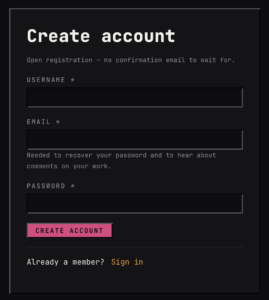
An account lets you:
- Submit your work for publication.
- Post notices in Connect.
- Comment on published work.
- Keep a member profile.
If you already have an account, sign in using your username and password. If you forget your password, select Lost password? on the sign-in page and follow the instructions.
Share your work
Select Submit while signed in.
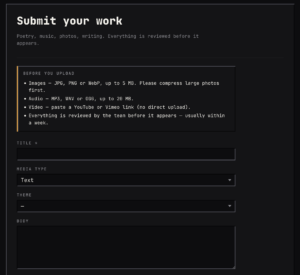
Add a title, enter your text or a short introduction, and choose the theme and media type that best fit your work. Add the relevant files or video link, then submit it for review.
The supported formats are:
| Work | Format |
| Text | Enter your writing directly in the form. |
| Photos | JPG, PNG or WebP, up to 5 MB per image. |
| Audio | MP3, WAV or OGG, up to 20 MB. |
| Video | A YouTube or Vimeo link. |
For video, use a direct link to the individual video rather than a playlist. For images, smaller files help pages load faster. We recommend compressing images through various free online tools that can do that for you.
Make sure your submission tells the story you want to tell. Take a moment to ensure your title, description, and media are complete and ready to share, as you won’t be able to edit your work after submitting.
Every submission is reviewed before it appears. Sending your work does not publish it immediately, and approved work may be scheduled for a later release.
If something goes wrong or you change your mind about a post, just reach out to us at find@commonstrangers.gr, and we’ll be happy to help sort things out.
Use Connect
Connect is the community noticeboard: somewhere to share an idea, find a collaborator, offer work or look for a place to live.
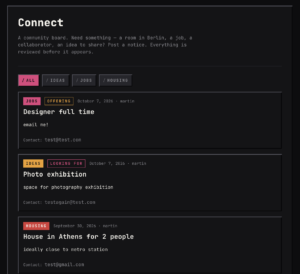
Browse all notices, or choose a section:
- Ideas: projects, proposals and people to collaborate with.
- Jobs: work opportunities and requests.
- Housing: places to live, available rooms and housing searches.
To add your own notice, sign in and go to Post a notice on the Connect page. Choose the relevant section and explain what you’re offering or looking for.
Include helpful details like the location, dates, and how people can reach you. Keep in mind that any contact details you include will be publicly visible, so only share what you’re comfortable making public.
Notices are reviewed before they appear. If you’d like to respond to one, use the contact details provided by its author. If none are available, just reach out to us at find@commonstrangers.gr, and we’ll help you get in touch.
Join a conversation
Sign in and open a piece of work to leave a comment.
Comments are reviewed before they become visible, so yours may not appear immediately. Give it time before sending it again.
Find events and listen to the radio
When upcoming events are listed, Agenda shows what’s happening, where and when. Open an event to read its description and any attendance or ticket information.
The Radio link in the homepage menu opens Parea Radio in a new tab, so you can listen live while exploring Common Strangers. Pretty cool, right?
Watch for the next drop
When a countdown appears on the homepage, it points to an upcoming release or announcement. Come back when it reaches zero to discover what’s new.
Latest Drop is where you’ll find the newest publications, shared by Common Strangers for Common Strangers, in a new issue every two weeks. Each issue stays in the Latest Drop window until the next one arrives.
Looking for something older? You can always find past publications through the menu categories or by searching on the Explore page.
Having trouble?
If a file won’t upload, check its format and size against the limits above.
If your submission, notice or comment isn’t visible, it may still be waiting for review.
If a password-reset email doesn’t arrive, check your spam folder.
You’ll find the site’s Privacy and Terms links at the bottom of the page in the Menu sidebar.